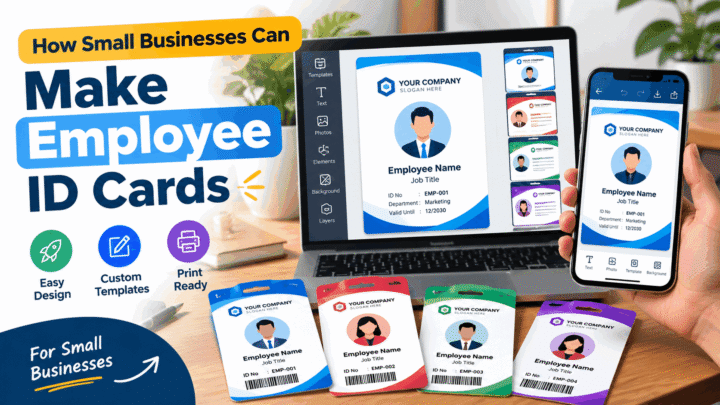
An employee card has three jobs, and they pull in different directions. It has to identify the person holding it, show that they belong on the premises, and survive being carried every day for years. Getting those three right is mostly a matter of deciding what goes on the card — and, more importantly, what does not.
Start with what the card must do
Before layout, answer four questions:
- Who checks it? A receptionist glancing at a face, a door reader, or a warehouse supervisor at 6 am in poor light? Each one changes how big the name and photo need to be.
- How long does it last? A six-week contract and a fifteen-year career need different materials.
- What unlocks? Nothing, a building, a till, a vehicle, a computer? Access control is the single most common reason a card design has to be revised later.
- Who replaces it, and how? If nobody owns that answer, the card design is not finished.
Choosing the fields
The average employee card has room for four or five pieces of information before it starts to look crowded. Ranked by how often someone actually reads them:
- Photo — the whole point of a visual card.
- Name — given name first, in the largest type on the card.
- Employer or organisation — so a third party knows what the card proves.
- Employee number — for payroll, access systems and the register that replaces lost cards.
- Role or department — useful in large sites, optional in a small team.
Then there are the fields people add because they seem sensible, and quietly regret:
- Home address and personal phone number. The card is not a secure document, and it gets lost. Anything on it should be information you are comfortable being found by a stranger.
- National ID or tax numbers. Rarely needed for a workplace badge, and a poor thing to print on something that stays in a pocket or a locker.
- Blood group, allergies, emergency contact. This belongs on a separate, purpose-designed medical card — not on a badge that everybody can see at a desk.
- Long policy text. Nobody reads it. Put a one-line instruction instead: what to do if the card is found.
Designing for a workforce of different ages and eyesight
The failure mode of employee cards is small, low-contrast type chosen on a large monitor and never checked at arm’s length. Two rules prevent most of it:
- Name no smaller than about 10 pt at print size, and everything else no smaller than 7 pt. If a field cannot be set that large, it probably does not need to be on the card.
- Text on a light background. Light text on a dark panel looks sharp on screen and fills in when printed on a cheap printer or viewed under a doorway in the rain.
Keep the print weight regular or medium. Thin, elegant typefaces with fine strokes are the first thing to disappear on a laminated card.
Photo standards for staff
A consistent set of card photos looks professional, and it is achievable without a photographer:
- one crop ratio for everyone — 3:4 is a good default;
- head and shoulders, facing the camera, plain light background;
- the same head size in every photo, so the cards read as a set;
- brief people in one line: “plain wall, face a window, no hat, look at the camera”.
A photo only needs to be good enough to say “yes, that is them” from a metre away. Perfection is not the standard; consistency is.
Leaving room for access control
Even if nothing is planned today, two low-cost decisions keep the door open:
- Leave 15 × 15 mm clear in a corner that is not over the photo. A proximity chip can be laminated into a PVC card, and a printed barcode or QR code needs quiet margins around it.
- Never put a barcode or chip area over the text. Card printers can only encode a chip where the card body is not embossed, printed or punched.
If access control is already in place, ask the system supplier for the placement they require before you finalise the layout. Re-issuing a thousand cards because a chip landed in the wrong corner is an expensive way to learn this.
Issuing, numbering and replacing
Three small disciplines save a great deal of trouble:
- Give every card a unique number and record who holds it. A simple spreadsheet is enough, but it has to exist before the first card is handed out.
- Write down the process for leavers. Collect the card on the last day, deactivate the access credential, and mark the record as returned. A card that still opens a door after someone has left is a security problem, not a paperwork one.
- Decide a replacement policy and tell people what it is: who pays for a lost card, and how quickly a new one can be produced. A first replacement free and a small charge afterwards is a common and defensible arrangement.
Printing options compared
- Printed and laminated paper — cheapest, fine for short contracts and temporary staff, but the lamination has to cover the card edge to edge or it peels from the corner. Expect months, not years.
- PVC card printer — the standard for a permanent workforce. Durable, allows chips, looks consistent. Needs a printer and consumables, so it suits an organisation issuing cards regularly.
- Outsourcing to a card bureau — best quality and consistency, and no hardware to buy. You trade lead time, and you have to send staff data and photos to a third party.
A ten-point checklist
- Name is the largest element and at least 10 pt.
- Photo is cropped to one ratio, with the same head size across the batch.
- Employer is clearly identified.
- Employee number is present and legible.
- No personal data that a lost card would leak.
- Text sits on a light background with strong contrast.
- Nothing important is within 3 mm of the edge.
- A clear area is reserved for a chip, barcode or QR code if one may be needed.
- There is a numbered register of who holds which card.
- There is a written process for issuing and for collecting cards from leavers.
Making the cards
For a small team, ID Card Maker on Android covers the whole job: pick an employee template, add the photo, name, role, employee number and organisation, then export a PNG or PDF and print. For hundreds of staff, you will want a card printer, a database and a proper joining and leaving process — but the design decisions above are the same either way, and they are the part that is expensive to change later.