How Small Businesses Can Make ID Cards for Employees
Employee ID cards are a simple but useful addition to a professional workplace. Whether you run a small office, retail store, agency, restaurant, warehouse, or startup, employee ID cards can help identify staff members and create a more organized work environment.
The good news is that small businesses do not always need an expensive design agency or complicated software to get started. With a business ID card maker, you can create a design that matches your brand, add the necessary employee details, and prepare cards for digital use or printing.
In this guide, you’ll learn how to make employee ID cards, what information to include, how to choose a design, and how to avoid common mistakes.
Why Do Small Businesses Need Employee ID Cards?
Employee ID cards are not just for large companies. Small businesses can benefit from having a consistent way to identify their team members.
Here are some practical reasons to consider them.
1. Make Employee Identification Easier
When employees wear ID badges, managers, coworkers, customers, and visitors can identify staff more easily. This can be particularly helpful in retail stores, offices, customer service centers, and workplaces with multiple teams.
2. Build a Professional Brand Image
A well-designed employee ID card can reinforce your company’s visual identity. Using consistent colors, a logo, and readable typography helps create a more professional appearance.
3. Keep Your Team Organized
Employee cards can display names, job titles, departments, and employee numbers. These details can help distinguish team members, particularly as a business grows.
4. Support Workplace Security Procedures
ID badges may form part of a workplace identification process. However, a printed card alone does not verify someone’s identity or control access to a building. Businesses that need restricted-area access should use appropriate access-control systems and procedures.
What Is a Business ID Card Maker?
A business ID card maker is a tool that helps you design employee identification cards without creating every element from scratch.
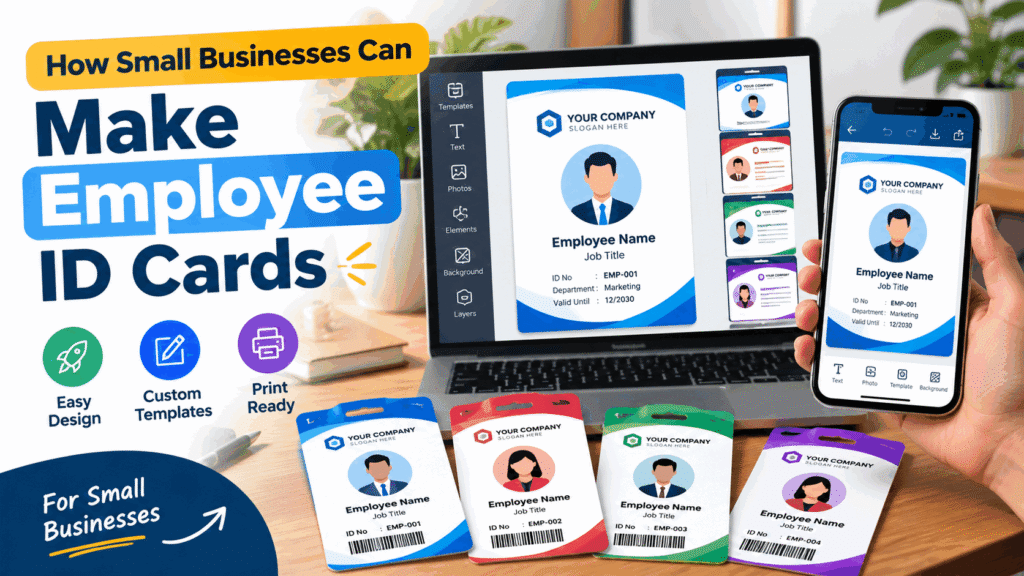
Depending on the tool, you may be able to customize a template, add a company logo, place an employee photo, change colors, adjust text, and export the finished design.
Some tools are designed for quick mobile editing, while others offer more advanced desktop layouts, employee databases, or batch-generation features.
For a small business, the best tool is usually one that is easy to use, supports the required output format, and produces a clear design without unnecessary complexity.
What Information Should an Employee ID Card Include?
The information on an employee ID card depends on your workplace and how the card will be used. A simple design is often easier to read than one crowded with unnecessary details.
Consider including these elements:
- Company logo: Helps employees and visitors recognize the organization.
- Employee photo: Useful when visual identification is part of your workplace process.
- Employee name: Makes the card easy to identify.
- Job title or department: Shows the employee’s role.
- Employee ID number: Provides an internal reference where needed.
- Company name: Identifies the employer.
- Optional contact or return information: Include only what is necessary and appropriate.
You do not need every field on every card. For example, a small shop may need only a logo, employee name, photo, and job title, while a larger organization may use a department and employee number.
Privacy tip: Avoid printing personal phone numbers, home addresses, dates of birth, or other sensitive information unless there is a clear business need. Employee ID cards may be visible to customers and other people outside the organization.
How to Make Employee ID Cards for a Small Business
You can follow this process whether you are designing one card or preparing a consistent style for a small team.
Step 1: Decide What the Cards Are For
Start by identifying the purpose of your employee cards. Are they mainly for visual identification, customer-facing staff, internal organization, or integration with a separate access-control system?
This decision determines what information you need and whether a basic printed card is sufficient.
Step 2: Choose an ID Card Maker
Select a tool that suits your workflow. A mobile app may be convenient when you want to create a design quickly, while desktop software may be preferable for detailed layouts or handling many employees.
Before choosing a tool, check whether it supports the features you need, such as:
- Custom text and colors
- Logo and photo placement
- Reusable templates
- Suitable image or PDF export
- The ability to save and update designs
If you need to generate hundreds of cards, check specifically for spreadsheet imports or batch-generation features rather than assuming every ID card maker supports them.
Step 3: Add Your Company Branding
Use your company logo and brand colors to create a consistent appearance. Two or three complementary colors are often enough.
Keep the background simple and make sure the text contrasts clearly with it. If your logo contains many colors, use a more neutral background to keep the card readable.
Step 4: Arrange the Employee Information
Place the employee’s name where it can be read easily. Keep the photo, job title, and employee number aligned in a clear visual hierarchy.
Avoid making every field the same size. The employee’s name should usually be more prominent than secondary information such as a department label.
Step 5: Review the Design
Before exporting, check the spelling of every name, the employee number, the company logo, and the job title.
Use a consistent format for all employees. If you are creating several cards, review each one individually instead of assuming that copying a template guarantees accuracy.
Step 6: Export and Print When Needed
Choose an output format suitable for your intended use. A high-quality image or print-ready PDF may be useful, depending on the tool and printer.
Confirm the card dimensions, page scaling, margins, image quality, and print settings before producing multiple copies. If you plan to use plastic cards, check the specifications of your card printer or printing service.
Step 7: Establish a Simple Update Process
Employee details can change when someone changes roles, joins another department, or leaves the company.
Decide who is responsible for updating the designs and collecting old cards when appropriate. Keep employee records securely and limit access to people who need them.
How to Choose the Right Employee ID Card Design
The ideal design depends on your industry and workplace.
Office and Corporate ID Cards
Corporate designs generally work well with clean typography, a company logo, a professional color palette, and a clear employee photo.
Retail and Customer Service Badges
Retail teams may benefit from cards that make employee names and job titles easy to read. Avoid overly decorative backgrounds that compete with the text.
Restaurant and Hospitality Staff
Hospitality businesses may prefer compact, simple badges that identify employees by name and role. Consider durability and readability when choosing materials.
Warehouse and Industrial Workplaces
Industrial environments may require durable cards and additional workplace identification procedures. A standard printed badge should not be treated as a substitute for required safety equipment or secure access systems.
Startups and Small Agencies
Startups can use a flexible template that is easy to update as the team grows. Consistent branding is often more valuable than adding lots of design elements.
Common Mistakes to Avoid
Even a simple ID card can become difficult to use if the design is poorly planned.
Using too much information: Include only details that support identification or a genuine workplace requirement.
Choosing hard-to-read fonts: Decorative typography may look attractive on a screen but can be difficult to read on a small printed card.
Using low-resolution photos: Blurry images reduce the overall quality of the finished design.
Ignoring brand consistency: Different layouts and colors across employee cards can make a small team look disorganized.
Skipping the print test: A design that looks good on a phone may have text that is too small when printed.
Assuming a card provides security: A printed ID badge can support visual identification, but it is not proof of identity or a complete access-control solution.
Sharing employee data carelessly: Use trusted tools, review their privacy practices, and avoid uploading sensitive employee information unless necessary.
Can You Make Business ID Cards on a Mobile Phone?
Yes. A mobile ID card design app can be a practical option for small business owners who need to create or edit a simple card without using desktop design software.
A typical workflow involves selecting a template, adding a logo and photo, entering employee details, adjusting the colors, and exporting the design.
Before choosing an app, confirm that its current version supports the card layout and export format you need. Features can vary between apps and versions.
If you are exploring mobile design options, you can check out ID Card Maker: Digital ID Card on Google Play. Review the current app listing to confirm its available features and whether they fit your requirements.
Business ID Card Maker: Free Tool or Paid Software?
The right option depends on how many cards you need and how you plan to manage them.
A free or basic tool may be sufficient if you need a few simple cards and can update each design manually. Paid software may be worth considering if you require bulk generation, centralized employee records, advanced templates, team access, or integrations.
Before paying for a tool, check its export restrictions, watermark policy, available templates, privacy terms, and whether it supports the output format your printer requires.
Do not assume that a tool advertised as free includes every feature at no cost.
Frequently Asked Questions
What is the best business ID card maker for a small business?
The best option is one that matches your budget, design requirements, and number of employees. Compare template customization, logo and photo support, export formats, ease of use, and privacy practices before deciding.
Can I make employee ID cards for free?
Some tools offer free templates or basic design features. However, premium templates, advanced exports, bulk generation, or printing may require payment. Check the terms of the specific tool before starting.
What size should an employee ID card be?
There is no single size for every situation. A common plastic badge format is approximately 85.6 × 54 mm, similar to a standard payment card, but you should confirm the specifications of your printer or card supplier before finalizing the design.
Should employee ID cards include a QR code?
Only if the QR code serves a clear purpose. It could link to a company directory or an internal resource, depending on your setup. Do not place sensitive employee information in a publicly accessible QR code, and do not assume that a QR code automatically makes a card secure.
Can I create ID cards for multiple employees?
That depends on the tool. Basic editors may require you to create each card individually, while specialized business software may support spreadsheet imports or bulk generation. Confirm this capability before choosing a solution for a large team.
Are printed employee ID cards secure?
A printed badge can help people recognize employees, but it can be copied or misused. For sensitive workplaces, combine badges with appropriate verification procedures and access-control technology.
Final Thoughts
A business ID card maker can help small businesses create employee cards that look consistent, communicate essential information, and reinforce company branding without an unnecessarily complicated design process.
Start with a clear purpose, include only the information you need, choose readable typography, and review every card before printing. As your business grows, you can consider tools with reusable templates, bulk generation, and better employee-record management.
The goal is not to make the most complicated card. It is to create an ID card that is professional, readable, appropriate for your workplace, and easy to maintain.